


Usein kysyttyjä kysymyksiä, vinkkejä ja vihjeitä
Etikettien suunnittelu on helppoa: täältä löydät ohjeita vinkkejä ja vihjeitä online-etikettiavustajan käyttöön.
Jos et löydä täältä oikeaa vastausta kysymykseesi tai jos sinulla on muita online-etikettiavustajaan liittyviä toiveita, lähetä meille sähköpostia osoitteeseen verkaufsteam-handel@herma.de.

Bar & QR Codes
-
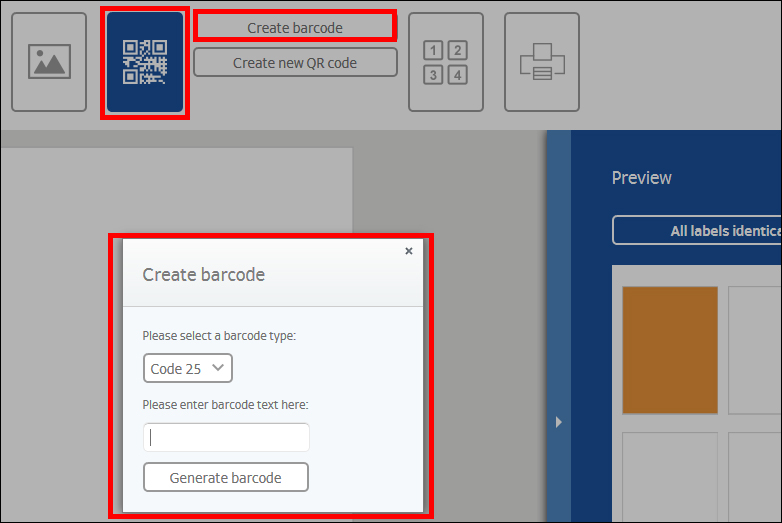
How do I insert a bar code?
Select the “Barcode/QR code” button and click on “Barcode”. In the window which opens, first select the barcode type and then enter the barcode text. Then click on “Generate barcode”. You can move or rotate barcode on the label as with any other object.
You can also insert a barcode when merging documents. After uploading your file, select the “Set up barcode/QR code” checkbox in the Mail merge wizard. Then specify the fields for which you want to create a barcode. "
-
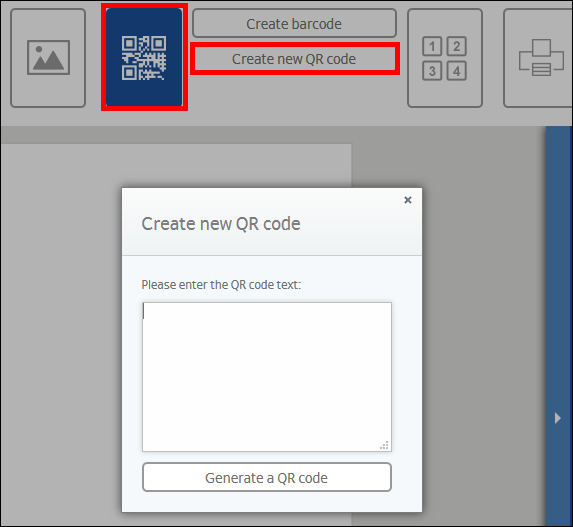
How do I insert a QR code?
Select the “Barcode/QR code”button and click on “QR code”. In the window which opens, enter your text or target address. Then click on “Generate QR code”. You can move or rotate QR code on the label as with any other object.
You can also insert a QR code when merging documents. After uploading your file, select the “Set up barcode/QR code” checkbox in the Mail merge wizard. Then specify the fields for which you want to create a QR code."
Tärkeää:
Suunnitteluohjelmistoa ei ole optimoitu mobiilipäätelaitteille.
Voit silti avata sen tai lähettää linkin itsellesi sähköpostitse napsauttamalla ”Lähetä linkki” -painiketta. Siten voit avata suunnitteluohjelmiston myöhemmin pöytätietokoneellasi.
Lähetä linkki